
Make Your Chrome New Tab Smarter
For those of us who rely on Google Chrome every day, the New Tab page is prime real estate. It’s the first thing you see when you open the browser. Yet Chrome’s default New Tab comes with a frustrating limitation — you can only keep up to 10 shortcuts.
If you regularly visit more than 10 websites, the rest end up buried inside bookmark folders. That slows you down.
Here’s where Royal Start changes the game.
Royal Start transforms your simple New Tab into a clean, powerful productivity dashboard designed for speed and organization.
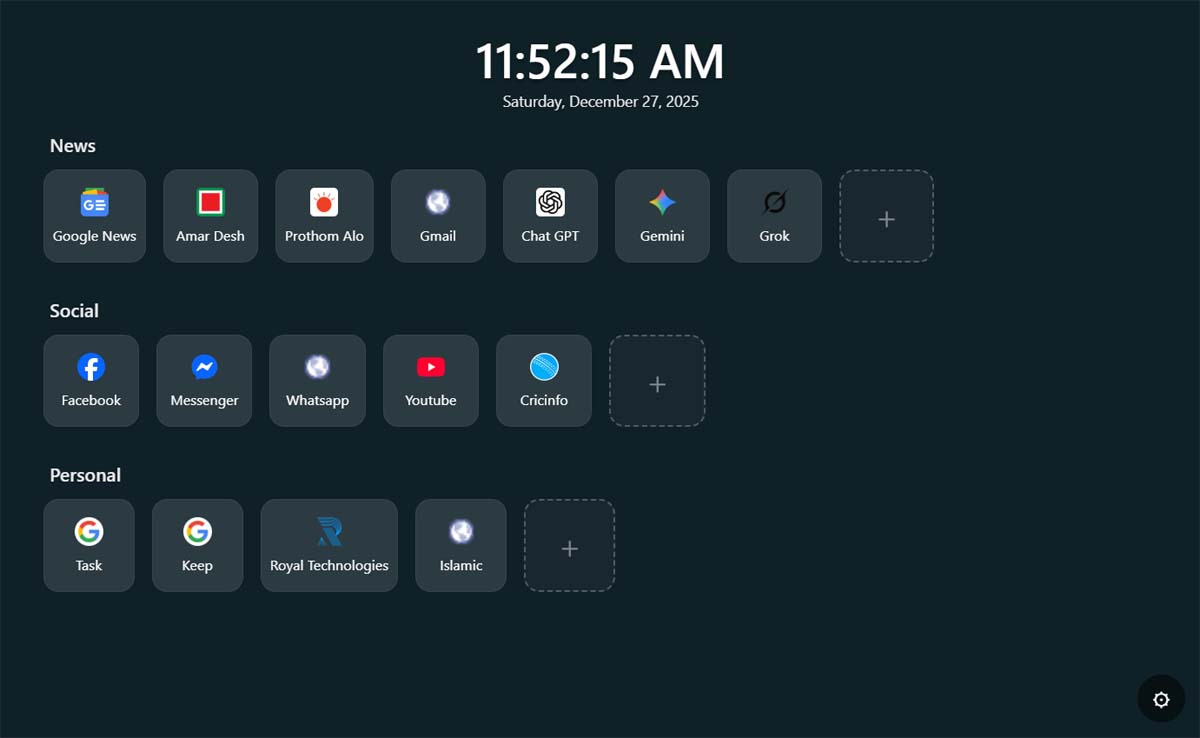
Why Switch from the Default Tab to Royal Start?
The difference between Chrome’s default New Tab and Royal Start is night and day. Let’s break it down.
1. Not 10 — Up to 30 Shortcuts
Chrome limits you to just 10 thumbnails.
Royal Start allows up to 30 shortcuts, organized into 3 separate groups. That means you can neatly arrange:
• 10 office or work-related links
• 10 social media platforms
• 10 entertainment or personal sites
Everything stays structured and easy to access.
2. Fully Customizable Background
Tired of Chrome’s plain white look?
With Royal Start, you can:
• Upload any image from your computer as your background
• Use a solid color instead of an image
• Adjust overlay darkness to improve text visibility
You control how your dashboard looks.
3. Modern Design with Digital Clock
Royal Start isn’t just functional — it looks great too.
It features a large digital clock with date display that activates instantly when the page loads. The clean card-based layout gives your browser a premium feel without slowing it down.
4. Easy Drag & Drop Organization
Want to rearrange your links?
Simply drag and drop shortcuts to change their position or move them between groups. No complicated settings. Just click, move, and done.
5. Built-in Backup System
Worried about losing your setup after reinstalling Windows or Chrome?
Royal Start includes Export and Import functionality. You can back up your entire dashboard into a file and restore it anytime.
No more starting from scratch.
If you want to increase your workflow speed and break free from the 10-shortcut limitation, Royal Start is a smart upgrade.
It’s lightweight, fast, and secure.
Install it today and make your New Tab actually useful.
Download here:
https://chromewebstore.google.com/detail/royal-start/gpfjpgmbnahjbmpnljgcpbhkfccnoeop